
DevOps Professional Program
Master core DevOps concepts, continuous integration and deployment, and automation practices through real-world projects and hands-on labs to build industry-ready DevOps skills.
Professional Certification
Upon successful completion, you will receive an industry-recognized credential.
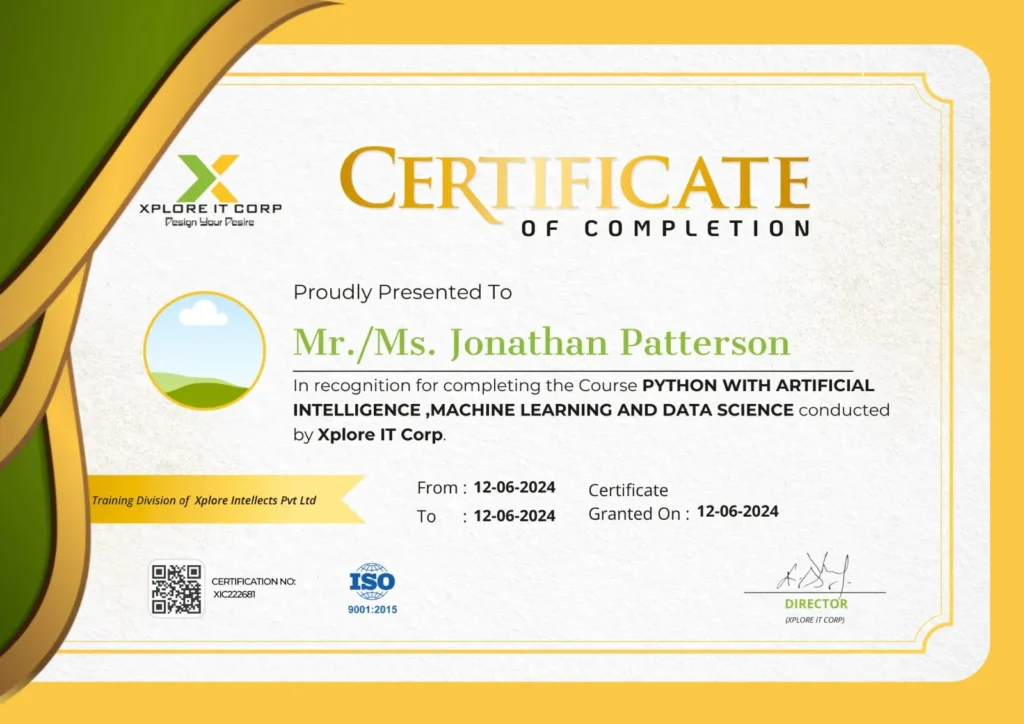
Industry-Validated Certification
Accredited by the Global Data Science Alliance and recognized by top tech employers worldwide.
Digital Verification
Includes a unique blockchain-verified ID that can be added directly to your LinkedIn profile.
Completion Criteria
Awarded upon submission of all 5 capstone milestones and passing the final technical assessment.

GOBINATH ARUMUGAM
Chief Technology Officer | AI, ML & Data Science Trainer
With a strong background in software and cloud technologies, Gobinath Arumugam delivers a practical, results-driven approach to DevOps training, simplifying complex DevOps concepts into clear, structured, and job-ready skills.
Focused on transforming DevOps knowledge into real-world applications through hands-on projects, CI/CD pipelines, automation, and practical problem-solving.
13+ years
at Xplore IT Corp
150+
Institutions Reached
2000+ Batches
Trained Across India
50,000+
Students Trained





Course Syllabus
A comprehensive 12-week journey from basics to professional mastery.
- DevOps Principles in detail
- DevOps Engineer Skills in the market
- Knowing DevOps Delivery Pipeline
- Market trend of DevOps
- DevOps Technical Challenges
- Tools we use in DevOps
- Essentials of Cloud computing?
- Cloud and virtualization architecture
- Cloud deployment architecture
- Cloud providers – An overview
- Why we need DevOps on Cloud?
- Introducing to Amazon web services
- DevOps
- Phases of Continuous Integration
- Software development methodology
- Introduction to DevOps
- Samples of Continuous Integration (CI) / Continuous Delivery (CD) –
Use cases
- Protect your AWS by different authentication system
- Password policies set for users
- AWS User Account and Groups in detail
- Creating custom policies in AWS
- Introduction about Roles and its use
- Creating Roles and associating policies
- Creating programmatic access and management console access forusers
- Associating policies to the user and groups
- Artifact repository and repository management
- Linux – General, shell programming, processes & signals …
- RabbitMQ…
- MariaDB
- Knowing about Version control
- Git – A CLI
- Essentials of GIT in industry
- How to setup GIT
Installing Git
First-Time Git Setup
Getting a Git Repository• Working with various commands in
GIT - CI/CD Github actions
- CI/CD Gitlab
- Recording Changes to the Repository
How to check the Status of Your Files
How to track New Files
Staging our modified files
Viewing Your Unstaged and Staged Changes
How to commit Your Changes
Skipping the Staging Area and commit
Removing Files from GIT
- Limiting Log Output
- Using a GUI to Visualize History
- Changing Your Last Commit
- Unstaging a Staged File
- Unmodifying a Modified File
- Showing Your Remotes
- Adding Remote Repositories
- Fetching and Pulling from Your Remotes
- Pushing to Your Remotes
- Inspecting a Remote
- Removing and Renaming Remotes
- What a Branch Is
- Basic in Branching and Merging
- Branch Management in GIT
- Branching Workflows and its usage
- Remote Branches – create and delete
- Rebasing
- Git workflows
- Git cheat sheet
- Essentials of Continuous Integration
- An example scenario where CI is used
- Know about
- Jenkins and its architecture in detail
- Jenkins tool Management in detail
- Know about User management in Jenkins
Authentication - Jenkins own database user creation
- Options to enable integration with LDAP
- Matrix based authorization
- Project based authorization
- Maven project structure
- Maven plugins
- Project Object Model (POM) – fundamental unit of work in Maven
project - Maven build lifecycle
- Adding external dependencies to maven pom.xml
Maven build and test project
- Maven project structure
- Maven plugins
- Project Object Model (POM) – fundamental unit of work in Maven
project - Maven build lifecycle
- Adding external dependencies to maven pom.xml
- Maven build and test project
- What is Jenkins Pipeline?
- Why Pipeline?
- Integration with GIT
- How to enable project based authorization for a job
- Source code management while creating jobs
- Triggering automated build
- Maven job setup
- Know about post build options for jobs like notifications, trigger
another build, publishing reports, etc.
ADDING A SLAVE NODE TO JENKINS
BUILDING DELIVERY PIPELINE
NOTIFICATION SETTINGS IN JENKINS
PLUGIN MANAGEMENT IN JENKINS
- Introduction
Real-world Shipping Transportation Challenges
Introducing Docker and its technology
Understanding of Docker images and containers - Working with container
How to Share and copy a container
Container Life Cycle
How to use Base Image and customize
Creation of Docker File
How to Publish Image on Docker Hub - Docker install on Amazon Linux AMI
- Docker install on EC2 Ubuntu 14.04
- Docker container vs Virtual Machine
- Docker install on Ubuntu 14.04
- Docker Hello World Application
- Nginx image – share/copy files, Dockerfile
- Working with Docker images : brief introduction
- Docker image and container via docker commands (search, pull, run,
ps, restart, attach, and rm) - More on docker run command (docker run -it, docker run –rm, etc.)
- Docker Networks – Bridge Driver Network
- Docker Persistent Storage
- File sharing between host and container (docker run -d -p -v)
- Linking containers and volume for datastore
- Dockerfile – Build Docker images automatically I – FROM,
MAINTAINER, and build context - Dockerfile – Build Docker images automatically II – revisiting FROM,
- MAINTAINER, build context, and caching
- Dockerfile – Build Docker images automatically III – RUN
- Dockerfile – Build Docker images automatically IV – CMD
- Dockerfile – Build Docker images automatically V – WORKDIR, ENV,
ADD, and ENTRYPOINT - Docker – Apache Tomcat
- Docker Compose with two
- containers – Flask REST API service
- container and an Apache server container
Introduction to Docker Networking - Network Types in docker technology
- Docker Container Networking
- Docker Compose – An introduction
- Docker Swarm – An introduction
- Use Docker Compose to create php, wordpress, mysql
- How to Start Containers on a Cluster with Docker Swarm
- Creating and Scaling an application in Docker swarm
- Introduction to Kubernetes
- Kubernetes Cluster Architecture — An overview
- Understanding concepts of Pods, Replica sets, deployments and
namespaces - Understanding the concepts of services and networking
- Kubernetes I – Running Kubernetes Locally via Minikube
- Kubernetes II – kops on AWS
- Kubernetes III – kubeadm on AWS
- AWS : EKS (Elastic Container Service for Kubernetes)
- Introducing Ansible – A configuration management tool
- What is Ansible?
- Quick Preview – Setting up web servers with Nginx, configure
environments, and - deploy an App
- SSH connection & running commands
- Ansible: Playbook for Tomcat 9 on Ubuntu 18.04 systemd with AWS
- Modules
- Playbooks
About Playbooks
Playbook Language Example – YAML
How to Write Playbooks
Tasks in Playbooks
Understanding about various tasks in playbook
Introduction to Handlers and variables - Learn about using handlers, variables in the playbook
- Handlers
- Roles
Role Directory Structure
Using Roles
Role Duplication and Execution
Role Default Variables
Role Dependencies
Role Search Path
Ansible Galaxy
Playbook for LAMP HAProxy
nstalling Nginx on a Docker container
AWS : Creating an ec2 instance & adding keys to authorized_keys
AWS : Auto Scaling via AMI
AWS : creating an ELB & registers an EC2 instance from the ELB
Deploying WordPress micro-services with Docker containers on
Vagrant box via
Ansible
Setting up Apache web server
Ansible with Terraform
Including and Importing
Includes vs. Imports
Importing Playbooks
Including and Importing Task Files
Including and Importing Roles
- Understanding IaC principles and its benefits in modern infrastructure
management. - Introduction to Terraform, its purpose, and its role in the DevOps
ecosystem. - Comparison of Terraform with other IaC tools (e.g., Ansible,
CloudFormation).
- Installation and configuration of Terraform CLI.
- Understanding HashiCorp Configuration Language (HCL) syntax:
blocks, arguments, attributes, expressions, functions. - Terraform providers: how they enable interaction with various cloud
and on-premise platforms (e.g., AWS, Azure, GCP). - Core Terraform workflow: init, plan, apply, destroy.
- Variables and Outputs:
Defining input variables, outputting resource attributes, and
using local variables. - State Management:
Understanding Terraform state files, remote state backends
(e.g., S3, Azure Blob Storage), and state locking - Modules:
Creating and consuming reusable Terraform modules for
modular and organized configurations. - Workspaces:
Managing multiple environments (dev, staging, prod) using
Terraform workspaces. - Provisioners:
Utilizing local-exec, remote-exec, and file provisioners for postprovisioning tasks. - Data Sources:
Querying existing infrastructure or external data within Terraform
configurations.
- CI/CD Integration:
Integrating Terraform into CI/CD pipelines using tools like Jenkins,
GitLab CI, or GitHub Actions. - Version Control:
Best practices for managing Terraform configurations with Git. - Testing Terraform Code:
Techniques and tools for testing Terraform configurations. - Security in IaC:
Implementing security best practices within Terraform configurations
(DevSecOps).
- Hands-on exercises and projects involving provisioning and
managing resources on a chosen cloud provider (e.g., deploying an
EKS cluster on AWS, setting up a web application on Azure). - Case studies demonstrating the application of Terraform in various
DevOps scenarios.
Introduction to Terraform Cloud/Enterprise features like remote operations,
Sentinel policies, and team management